How Some Companies Do Support

  • Subscribe to our RSS feed.
  • Twitter
  • StumbleUpon
  • Reddit
  • Facebook
  • Digg

Monday, 2 January 2012

IE9 Meet Your New Browser Welcome Page Tab Opens When IE9 Starts

Posted on 13:45 by Unknown
IE9 Meet Your New Browser Welcome Page Tab Opens When IE9 Starts

This is a very interesting post. It involved IE9 and the Meet your new browser welcome page. It has been written with a solution by the author for windows 2008 R2 server but the same solution can be applied to windows 7.

Prevent Internet explorer Welcome Tab from Opening


IE9, although it looks very similar to IE8, is a different browser in many respects and in particular in regards to security. One of the differences hat can catch a terminal server admin (RDS windows 2008) a surprise is that cookies are disabled by default with IE9. Admins will now, one way to circumvent this problem would be to setup the default user profile before the suers begin logging in for the first time. One hey login, their local or roaming profile is created and used after that. Once the user profiles have been created, the solution for solving the cookie problem can be solved using a logon script.

Internet Explorer 8 and Internet Explorer 9 Welcome Page Tab


The meet your new browser welcome tab can also be very annoying and for less savvy computers users, cause them to call in for tech support.
One of the ways to solve the meet your new browser welcome page and also make the IE( setup question asking the user to select express setting or customer settings is to use local group policy editor on the server.
Read More
Posted in 2008, ie9, r2, rds, tab | No comments

Thursday, 2 December 2010

HP NC373i: The network link is down

Posted on 07:20 by Unknown

Share/Save/Bookmark

This error would appear in the system log of the server almost everyday in the morning - HP NC373i: The network link is down . Never during the day such as late afternoon or evening. The error would occur early in the am hours juts before and at times when employees juts start reporting to work. Event id4, source l2nd.
The driver version was not updated yet. The possible solution is checking and disabling power save mode for the NIC. The server was running windows 2003 server standard edition on an HP Proliant series server hardware platform. The next step will be to update the driver version. There have been TCP offload problems with some drivers. The version installed on this server was fairy new but an update was available.

Read More
Posted in 2003, down, HP, l2nd, link, NC373, network, Server, windows | No comments

Thursday, 31 December 2009

Supporting Technology with Technology.: Enable 24 bit color in RDP for XP or 2003 Server

Posted on 14:42 by Unknown


Supporting Technology with Technology.: Enable 24 bit color in RDP for XP or 2003 Server

The option to connect to XP systems or windows 2003 servers with a color depth higher than 16 bits is available to be selected as an option before connecting to the remote computer. However, the RDP connection is never made at a color depth higher that 16 bits to neither a windows 2003 server or an XP desktop. There is a way to connect with true color 24 bit using rdp to XP or windows 2003 server.
A pre-defined default limit on the remote XP or windows 2003 server limits the color depth of RDP connections to 16 bit maximum on XP or windows 2003 server but can be changed to 24 bit true color by using group policy o nthe rmote computer or for all computers in a windows domain by linking a GPO to an OU or domain. How to configure the "server side" of remote desktop to accept connections at 24-bit true color.
Windows 7, Vista, and server 2008 already allow higher that 24 bit color by default.
Read More
Posted in 16 bit, 2003, 24 bit, color, colour, RDP, terminal server, windows, XP | No comments

Tuesday, 24 November 2009

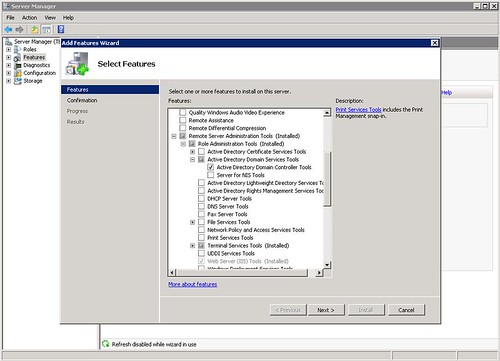
Adding dsa.msc on Windows 2008 Server

Posted on 20:02 by Unknown

Share/Save/Bookmark


How to add dsa.msc to windows 2008 server

If you wanted to access active directory users and computers from a member 2003 server it was as easy as clicking start run then entering dsa.msc in the box and click open. That little useful feature is not added into a default 2008 server installation it needs to be added during the initial installation of the server or afterwards by adding a feature. The image in this post shows what options to select to add the dsa.msc command back into your member server. For people who use this a lot it's quite worth the several minutes to install. Adding the feature does not require a reboot.
Read More
Posted in 2008, AD, dsa.msc, remote administration, Server, users and computers | No comments

Friday, 23 October 2009

Dell SAS 6iR Plug-in card, PCI Express x8, 2 CH, PC, Unix

Posted on 17:22 by Unknown
Share/Save/Bookmark


Dell SAS6/iR Integrated SAS Controller Card Storage controller (RAID)- Serial ATA-300 / SAS- 300 MBps - Plug-in card, PCI Express x8, 2 CH, PC, Unix .

This RAID controller card from Dell only supports RAID 0 and RAID 1. It support 2 hot swap drives and has a combined 12Gbps throughput from 4 channels at 3Gbps. It's not a bad controller card for entry level servers and workstations but one of it's limitations is that it does not support RAID 5 or RAID 10 (RAID 0 + 1). I discovered this unfortunately when trying to configured RAID 10 (RAID 0 +1) in a PowerEdge r610 server.

Dell Storage Controllers


Dell Storage Controllers

Desktop and server remote access support software

Read More
Posted in 2 CH, pc, PCI Express x8, Plug-in card, Unix | No comments

Monday, 13 October 2008

Configure RDP Port Forwarding on a Cisco ASA 5505

Posted on 15:46 by Unknown
Share/Save/Bookmark


Cisco ASA5505
For those of you searching the Internet to try and find a good or simple example of how port forwarding is done on a Cisco ASA 5500 series firewall (in this example, it is a Cisco ASA 5505 version 7.2) This post contains a working example of a port forwarding configuration on a Cisco ASA 5505 that's allowing RDP, TCP port 3389, through the firewall to from the Internet to the LAN side to a server. For new users to the ASA, how to configure a port forwarding rule on a Cisco ASA 5505 can be a more easily accomplished if the working configuration of a working ASA5505 is viewed. For many of the more seasoned users of the Cisco security appliance, port forwarding is very easy and need not be searching for answers.

Since the RDP protocol and the services running on windows XP and Vista client machines are derivatives of Microsoft's Terminal Server, the proceedure for setting up a port forward configuration for Microsoft terminal server is the same. The Cisco ASA5505 is not concerned what you are connecting to behind it, it's just concerned that its own configuration allows the right data and connection to go through.

Below is a GUI shot of a working RDP (Terminal Server) port forward configuration running on a Cisco ASA 5500 series firewall. The TCP port number 3398 is forwarded from the outside interface that's part of VLAN2 to the inside interface that's part of the VLAN1.

!
interface Vlan1 nameif
inside security-level 100
ip address 192.168.1.1 255.255.255.0
!
interface Vlan2 nameif
outside security-level 0
ip address dhcp setroute

Using the example below, just swap out the ip addresses shown in the static NAT translation for port forwarding RDP (terminal Server) with your own and you have a connection from the Internet to the LAN.


If you prefer command line, it's three lines of code at the command line that will do a simple port forwarding for RDP on the Cisco ASA.

Here they are:

access-list outside_access_in extended permit tcp any interface outside eq 3389
static (inside,outside) tcp interface 3389 192.168.1.10 3389 netmask 255.255.255.255
access-group outside_access_in in interface outside

Obviously, if you are looking to use the lines of code shown in the example above, change the 192.168.1.10 ip address shown above to be the address of the computer or server your forwarding RDP (terminal server) port to connect to. You can essentially use this example for terminal server RDP or for any other forwarding requirement you may have like ftp, http,smtp, etc.


Link to this post:

http://remotesupportsoftware.blogspot.com/2008/10/configure-rdp-port-forwarding-on-cisco.html

Link to this blog:

http://remotesupportsoftware.blogspot.com


Read More
Posted in 5505, ASA.5500, cisco, port forward, RDP, terminal server, windows | No comments

Thursday, 15 May 2008

Service Pack 3 Doesn't Install IE7

Posted on 06:24 by Unknown
The fact that SP3 for XP doesn't install IE7 was a very good decision made by Microsoft. There are still too many applications that rely on IE7 and would break if installed with an update.


XPSP3 is just over 300 MB. This is a nice sized download and contains all previous hotfixes after SP2.


List of fixes:


http://support.microsoft.com/kb/946480/


Read More
Posted in download, hotfixes, sp3, windows, XP | No comments

Tuesday, 13 May 2008

Catastrophic Failure Message Display During Installation

Posted on 13:31 by Unknown

Catastrophic failure for feature mini driver when installing, re-installing or removing the Fujitsu Windows scanning software.
If you get this message, while trying to install or remove the software from a desktop then open registry editor and do a search for the string windows scanning. Rename or remove the keys for these entries and especially the ones that have to do with the list of installed applications. The goal is to make Windows XP believe that this software is not already installed. Once this is complete then try installing the software again.
I had experienced this message while working with a fujitsu 5120 scanner. In windows, the scanner comes up as a fi-5120Cdj scanner and is popular with many medical manager applications.
Read More
Posted in catastrophic, fujitsu, scanner, software, windows | No comments

HP Online Diagnostic - Memory

Posted on 13:00 by Unknown


Read More
Posted in diagnostic, HP, memory, on-line | No comments

Tuesday, 6 May 2008

Information Technology Support - Adventure (Rated PG): Computer Desktop and Server Management

Posted on 15:18 by Unknown

Information Technology Support - Adventure (Rated PG): Computer Desktop and Server Management


Are you considering offering your customers a NOC type service for their desktops and servers. Want to monitor your customer's networ kand data infrustructure to provide more support and generate more revenue by knowing about problems before your customers do. Managed service can be provided by a software package known as Kaseya.
Read More
Posted in desktop, kaseya, manage, remote, Server, support | No comments

Saturday, 16 February 2008

Supporting Technology with Technology.

Posted on 07:33 by Unknown
Supporting Technology with Technology


Microsoft LiveMeeting has a new version and some great new features to go with it.

Sign-up for a demo:

LiveMeeting Demo

Read White Paper:

Conferencing and Collaboration White Paper
Read More
Posted in | No comments

Monday, 11 February 2008

Computer Support - Adventure (Rated PG): Computer Remote Support Software

Posted on 11:10 by Unknown
Computer Support - Adventure (Rated PG): Computer Remote Support Software
Read More
Posted in | No comments

Microsoft Live Meeting - Easy Assist Tech Support

Posted on 11:09 by Unknown


Microsoft LiveMeeting


Prior Post:
Computer Support - Adventure (Rated PG): Computer Remote Support Software


LiveMeeting Demo:

http://office.microsoft.com/en-us/livemeeting/HA102035491033.aspx

LiveMeeting Trial Download (registration form) :
https://trials.messaging.microsoft.com/site/

LiveMeeting is more than a conferencing and collaboration application. Hidden inside is online software application is computer remote support software for computer remote support.

I have used Microsoft's professional service, ie. technical support, on more than one occasion. I use heir per incident feature and have had decent experiences most of the time. The tool that Microsoft's tech support almost alwys has used to get remote access of the server I was working on has been their own product. That product is Easy Assist. Although there was a time that their support person used Live Meeting.

Although I have been, as many of have, around Microsoft and their products for so many years, it was the first time I saw their Live Meeting product at all. I believed at the time it  was for conferencing and collaboration online only. That day however I saw that it's a viable remote support tool as well.

Microsoft's easy assist computer support tool is one which I am much more familiar with. It works very fast and unfortunately because I deal with so many computer problems, I know where to go and what to do before the Microsoft technical support rep even has a chance to tell me. That product is less in features than Live Meeting but then again. It was not intended to be a collaboration and conferencing tool, providing technical support remotely is it's primary goal and purpose. The features I saw in Live Meeting, a product that is under the Microsoft product category of Office Online, was unbelievable. The current release is still Live Meeting 2007 which very much signals how advanced the product was at the time. I suspect there have been some cosmetic changes and back-end server bug fixes, and updates, etc., but the functionality in my opinion for even remote support over the web needed no updating.


Desktop remote support can be accomplished with Microsoft's LiveMeeting. The attendees are in a session with the presenter can optionally allow access to their applications (1 or more) for viewing or for remote control. This is useful feature and built-in tool of LiveMeeting as for demoing feature of a program of for online training and guidance. Tech support can use this feature too as they can access the desktops of the remote computers to show users how to perform specific task within an application, correct configuration errors or even install/upgrade new software.

The benefits are far reaching and the benefits out-way any of the negatives which there was only one that I saw. Microsoft LiveMeeting needs to install using the windows installer which in itself is not that bad. Where is can be come complicated, especially in regards to presentations. is that if a remote computer has a problem with the windows installer service on their computer desktop then Livemeeting will not start. This problem is present for many online apps. One of the ways to circumvent it or to overcome the possibility of this occurring is to have another method for the software, in this case computer remote support software that is imperative that it downloads and connects, is to download and install. Many applications use activex to add features to the browser or to give online access to more features for the desktop to utilize for the duration for the duration of the time the connection persists.


Remote Support Software

For fast access to clients' remote desktops, computers and servers there no better choice than remote support software. Remote support software helps technical supprot departments, support greoups and conpanies get to the problems faster by useing the web rather than traditional means for access computers for support.

Remote support on the web


Remote support on the web for remote computer access and desktop remote control support.
Read More
Posted in collaboration, conferencing, customer support, easy assist, express, live meeting, microsoft, online meetings | No comments

Wednesday, 9 January 2008

Hewlett Packard StorageWorks U320e (AH627A) Storage Controller and a Dell 2950 PowerEdge Server.

Posted on 15:07 by Unknown
Hewlett Packard StorageWorks U320e (AH627A) Storage Controller and a Dell 2950 PowerEdge Server.


The Hewlett Packard StorageWorks U320e (AH627A) Storage Controller is not compatible with the Dell 2950 PowerEdge Server.

In a previous port I review software how software tools that give techs the ability to remotely access and remote control computers both on the LAN and the Internet, benefit both the organization the tech works for and the customer, client or user who is receiving the desktop support.
http://remotesupportsoftware.blogspot.com/2006/12/remote-support-softwarethere-are-many.html


This was an onsite customer support call:

In this post I want to tell the world (tech world) about a little problem with a Hewlett Packard StorageWorks U320e (AH627A) Storage Controller intended to be used with a tape autoloader In a Dell 2950. I hope everyone bookmarks this page and lets the world know about the compatibility problems of this card with the Dell 2950 Server.

The card simply does not work in the PowerEdge. It will work in a PowerEdge 2900 but not in the 2950 model (who knows why). HP finally confirmed the problem and they will be shipping me a new storage controller that will work with the 2950. The symptoms are the fans just operate at high speeds and do not reduce their speed and their is no video. There's no much you can do at this point. I updated the BIOS and every other thing that had an update for it from Dell's website for this service tag. It just would not work.

Now HP OEMs these cards and places their name on them. The manufacturer was unable to confirm that the Hewlett Packard StorageWorks U320e (AH627A) Storage Controller card would not work and Dell's support simply said the card is compatible and there's nothing wrong with the server. After speaking with HP support for several hours, it was determined that the Hewlett Packard StorageWorks U320e (AH627A) Storage Controller is not compatible with the Dell 2950 PowerEdge.

Link to this post:

http://remotesupportsoftware.blogspot.com/2008/01/hewlett-packard-storageworks-u320e.html
Read More
Posted in (AH627A), 2950, Controller, Dell, Hewlett, Packard, PowerEdge, Server, Storage, StorageWorks, U320e | No comments

Sunday, 17 June 2007

Posted on 06:08 by Unknown
Symantec Norton Security group has been in my experience the worst in providing even just basic informational support. I had a question that was fairly easy for a customer and it's been a week and I've not received a response from them. Not even an automated response was sent back as a notification that the email was received - nothing. One week now and they've not replied. That is pathetic.


A previous post http://remotesupportsoftware.blogspot.com/2005/12/november-19th-2005-at-454-am-this-new.html highlighed reports how their software at the time had difficulty removing the W32/Sdbot-ADD worm.

Symantec products, in my opinion, aren't that good either, too pricey, often add to a problem, and in most cases I find them slow. For example, the Norton Antivirus software is a computer CPU and memory hog! While working on a system to resolve another issue, I'll turn off that program just to allow the computer to work faster so I could complete the original problem.

In the case of Norton security, it IS THE PROBLEM. What a piece of junk that program is. It's worse than Microsoft Vista's UAC (User Access Control). I had to work out a bunch of issues for a customer that was unable to send email because Norton security was blocking Outlook, yes Outlook, from sending email . Norton Security is a horrible joke to play on people.


Tags: symantec security,software, symantec,security
Read More
Posted in computer, customer, customer support, desktop, security, slow, software, support, symantec, tech | No comments

Thursday, 5 April 2007

Posted on 12:36 by Unknown
I wanted to add this little piece of knowledge to the online community and hope it's found useful for someone. While working with some Sonicwall firewalls, I needed to create a VPN tunnel between two units. It was a basic and simple VPN that was mostly comprised of default settings.
The
VPN tunnel wasn't coming up for me and in the log there was the message:

Received notify: INVALID_ID_INFO

This was an interesting message and it really had nothing to do with the identification of the tunnel or addresses or, SA name or description, or even with the remote firewall's names or descriptions. It was caused by having both of the
Sonicwalls in Aggressive mode for Phase 1 of the tunnel establishment. Switching both to Main mode solved the problem. The setting can be found in the VPN policy Proposals Tab.


Once this change was done, the VPN came right up and the two sites were communicating with each other. This is a setting that can catch some one off-guard and the message that inserted into the log can be deceiving. It can make one think the the name of something is incorrect. Sonicwall's support can have you running in circles too.

As a reminder:

Remote Support On The Web

For PC remote support software try a fast growing and affordable remote support solution. Support somputers over the web almost instantly and do it without creeating a crunch in your budget. Deliver remote tech support software to your users from the office and then from home or another office. If your Internet access provider changes, that's ok, this system is dynamic and can adapt to the changes so your not stuck and unable to continue supporting your users remotely. Some support systems provide you with a static program then if your ISP changes or you want to support your clients, customers or company end-users from another location you have to buy another program. This isn't the way it should be. This system is created in such a manner that you can change ISPs or locations and the programs provided to you for remote support on the web still work. Instantlay they are aware of the changes and the very next time your users connect for remote support from you the software already are using the new settings.


Read More
Posted in encryption, IKE, internet, network, sonicwall, support, tunnel, vpn | No comments

Friday, 22 December 2006

Posted on 06:20 by Unknown

Remote Support Software

There are many products on the market today that give computer technicians a tool for providing Internet based remote support software. The tools are generally of two flavors. One is the well known brand names of remote support that have a very technologically advanced and robust system for desktop remote support and communication like webex or gotoassist. These are the extremes on one end of the scale. They are well known brands and do a very nice job of giving techs the tool to remotely assist users on the web.

On the other end of the sclae is the least most technologicaly advanced systems that are merely a program sold to you that have network configuration information compiled into them so that when they are downloaded and executed, they are programmed to connect to your "burned in" address. These are cheap and found from a variety of software vendors. There are even site s that let you build you own program that will do exactly as described.

This type of program for
remote control access of computers over the web to provide web-based remote support works well. Their inherent problem is that when your location from which you are providing remote support from changes, the program is obsolete. Not only can they not adjust if the location your providing internet based remote support software from changes, but they will also fail if you change Internet providers. So let's say for example, you switch from cable to dsl or a dedicated circuit like a T1 or fractional T1, the PC remote support software program that has you network information burned into it for your to provide remote tech support to your users or customer s to has just been rendered useless because it's programmed to connect to your old network address.

A better aproach is to use a system that maybe is in the middle of these two extremes sicne at these two extremes come a price difference as well.
Read More
Posted in computer, Control, net, support | No comments

Wednesday, 26 July 2006

Posted on 09:01 by Unknown
Tone Software Corporation Tonesoft

ToneSoft's ReliaTel application sounds like an incredible product for monitoring and managing telecommunication devices. The devices could be from multiple vendors too. This is an app that I would love to see in action. Enabling Technologies Corporation has selected TONE’s ReliaTel Remote Management solution to expand the Enabling Managed Services Monitoring business.

Powerful Telecommunications Management Tool Monitors and Controls Multi-Vendor Devices From one Location

"A single convenient application, ReliaTel gives authorized staff complete control of multi-vendor voice systems. The system enables authorized staff to control local and remote devices, enabling global monitoring from one location with a common interface. With no need to buy multiple management packages or depend on outside monitoring centers, maintenance and staff training costs drop dramatically."

Read the rest of the news article on Tone Software's site
Read More
Posted in | No comments

Posted on 08:42 by Unknown
This is something new to add to the list of experiences.

I'm kind of baby sitting a computer network for a brokerage firm. They have their main offices in Manhattan but a bunch of the brokers have houses out east on Long Island - the Hamptons. This company has purchased a house and referbished the inside to make it look nice, new and comfortable. They equippedthe office with some state of the art computers, each with dual screens, and a high speed connection to the internet and their main office for trading. The computers ahve some financial broker type software on them from which the traders/brokers work from.
I'm spending the day out here waiting for something to fail I guess if they paid their IT staff more money, one of them would have a house out here too and be able to do this instead. I guess they don't and of course it's cheaper for them to hire my company to do it for them for the duration of the summer.
They've go a pretty good setup and it works out great for the employees. They finnish up work and with no commute home, they're in the pool by 4:30 in the afternoon. wow.

The dell desktops they have are quick and this is the fastest internet access I've experienced. The dual screens are pertty cool too but I'm not used to having them so it takes a little adjusting to look at both of them. I catch myself looking for a window I openned often on the same screen just to realize the window is o nthe other. Oh well...
Read More
Posted in | No comments

Friday, 26 May 2006

Posted on 20:21 by Unknown
Source:ITWorld
May 26, 2006

Enterprise software developer Hummingbird Ltd. said on Friday that it agreed to be purchased by holding company Symphony Technology Group in a deal valued at US$465 million.

The company reported a $4.9 million profit in its second quarter, driven by winning new customers and expanding deals with existing customers. Hummingbird competes with other ECM developers including Interwoven Inc., IBM Corp., EMC Corp. and FileNet Corp.
Provided the transaction is approved by shareholders and regulators, the acquisition is expected to close in July.
Symphony Technology Group owns several companies including Information Resources Inc. and Gers Inc.
Read More
Posted in | No comments
Newer Posts Older Posts Home
Subscribe to: Posts (Atom)

Popular Posts

  • Configure RDP Port Forwarding on a Cisco ASA 5505
    Cisco ASA5505 For those of you searching the Internet to try and find a good or simple example of how port forwarding is done on a Cisco AS...
  • (no title)
    VPNet Introduces Powerful New Remote Client VPNremote 3.0 offers service providers and enterprises a unique remote access solution that prov...
  • Catastrophic Failure Message Display During Installation
    Catastrophic failure for feature mini driver when installing, re-installing or removing the Fujitsu Windows scanning software. If you get th...
  • Dell SAS 6iR Plug-in card, PCI Express x8, 2 CH, PC, Unix
    Dell SAS6/iR Integrated SAS Controller Card Storage controller (RAID)- Serial ATA-300 / SAS- 300 MBps - Plug-in card, PCI Express x8, 2 CH, ...
  • (no title)
    Microsoft delays Vista Release It's so common that misrcrosoft delays their releases. I could remember going as far back as the first wi...
  • IE9 Meet Your New Browser Welcome Page Tab Opens When IE9 Starts
    IE9 Meet Your New Browser Welcome Page Tab Opens When IE9 Starts This is a very interesting post. It involved IE9 and the Meet your new brow...
  • Information Technology Support - Adventure (Rated PG): Computer Desktop and Server Management
    Information Technology Support - Adventure (Rated PG): Computer Desktop and Server Management Are you considering offering your customers a ...
  • (no title)
    How Some Companies Do Support. Microsoft delays release of Vista...
  • (no title)
    Newest Release of Siebel CRM Professional Edition Builds on Siebel's Momentum in SMB Market; Siebel CRM Professional Edition 7.8 Availab...
  • (no title)
    I have always like Lotus Notes . Although I have not used it personally in several years, I have associates that use it daily in their workp...

Categories

  • (AH627A)
  • 16 bit
  • 2 CH
  • 2003
  • 2008
  • 24 bit
  • 2950
  • 5505
  • AD
  • application
  • ASA.5500
  • catastrophic
  • cisco
  • collaboration
  • color
  • colour
  • computer
  • conferencing
  • Control
  • Control remote
  • Controller
  • customer
  • customer support
  • Dell
  • desktop
  • destkop
  • diagnosis
  • diagnostic
  • down
  • download
  • dsa.msc
  • easy assist
  • encryption
  • express
  • fujitsu
  • hardware
  • Hewlett
  • hotfixes
  • HP
  • ie9
  • IKE
  • infrastructure
  • internet
  • kaseya
  • l2nd
  • link
  • linux
  • live meeting
  • malware
  • manage
  • management
  • memory
  • microsoft
  • NBBS
  • NC373
  • net
  • netopia
  • network
  • on-line
  • online meetings
  • OS
  • Packard
  • pc
  • PCI Express x8
  • Plug-in card
  • port forward
  • PowerEdge
  • r2
  • RDP
  • rds
  • remote
  • remote administration
  • removal
  • scanner
  • security
  • Server
  • slow
  • software
  • sonicwall
  • sp3
  • spyware
  • Storage
  • StorageWorks
  • support
  • support server communications operating
  • symantec
  • system
  • tab
  • tech
  • terminal server
  • tunnel
  • U320e
  • Unix
  • users and computers
  • virtualization
  • virus
  • vista
  • vmware
  • vpn
  • windows
  • XP

Blog Archive

  • ▼  2012 (1)
    • ▼  January (1)
      • IE9 Meet Your New Browser Welcome Page Tab Opens W...
  • ►  2010 (1)
    • ►  December (1)
  • ►  2009 (3)
    • ►  December (1)
    • ►  November (1)
    • ►  October (1)
  • ►  2008 (9)
    • ►  October (1)
    • ►  May (4)
    • ►  February (3)
    • ►  January (1)
  • ►  2007 (2)
    • ►  June (1)
    • ►  April (1)
  • ►  2006 (18)
    • ►  December (1)
    • ►  July (2)
    • ►  May (2)
    • ►  April (5)
    • ►  March (2)
    • ►  February (3)
    • ►  January (3)
  • ►  2005 (8)
    • ►  December (8)
Powered by Blogger.

About Me

Unknown
View my complete profile